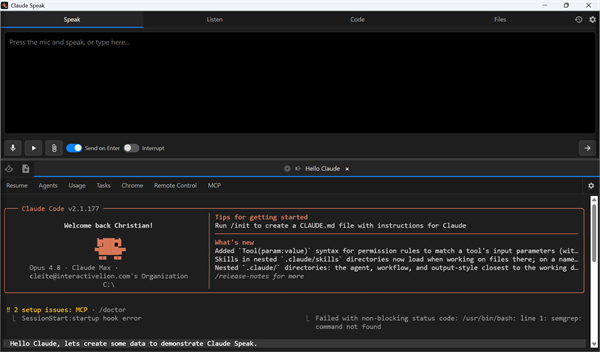
Claude Speak is a voice console for Claude Code. Speak or type your prompts, hear Claude’s replies read aloud with word-by-word highlighting, run the Claude CLI inside embedded terminals, and manage many sessions - each with its own settings - all docked beside your work. Claude Speak is available both as a standalone Windows application and as a Visual Studio extension.
Speak & Dictation
The Speak box is where you compose a prompt for the active terminal. Type your message or click the microphone to dictate, then click Send to deliver it. You can attach files with the paperclip or paste an image directly, and send with just an attachment and no text. An optional Interrupt mode stops Claude mid-task before delivering your new message so it picks up the instruction immediately. Speech-to-text supports either Claude voice dictation or Windows offline recognition, with an adjustable microphone timeout, optional auto-disable on send, and live word highlighting as you speak.
Listen, Playback & Voices
Claude’s replies appear in the Listen window and are read aloud with the current word highlighted. Full transport controls - previous, play, pause, replay, skip, volume and speed - let you move through a session’s message history, and you can click any word to set where playback resumes. A merged list of Microsoft and Google voices lets you assign a distinct voice per session so you can tell sessions apart by ear, with options to auto-switch to the Speak tab for hands-free replies, speak Claude’s step-by-step narration, and play multiple sessions through a single queue.
Code & Files Tabs
The Code tab keeps a running, collapsible list of the commands Claude executes alongside an embedded shell where you can run, copy or clear any command. The Files tab shows a chronological list of every file Claude reads, edits or writes - with line counts and a per-change diff - and opens files directly in the Visual Studio editor when hosted there. Both lists are maintained per session.
Sessions & Terminals
The bottom of the window holds one or more live Claude CLI terminals, each with its own command bar of one-click slash-command buttons. Create as many sessions as you need, each with its own name and working directory, and reopen or resume them from the Sessions drawer - which shows each session’s model, directory, token counts and transcript size. Session Resume can leave Claude’s resume menu up, compact the conversation to a summary, load the full prior conversation, or start cleared.
Per-Session Settings & Global Preferences
Global Preferences set the defaults for everything - Speak, Listen, Code, Files and Claude options. Each session’s gear mirrors those preferences and starts by following the global defaults; turn off any group’s “Use Global Settings” toggle to override just that area for that session. Claude Speak also upgrades the Claude Code CLI for you, closing and automatically reopening your sessions, with an optional quiet auto-update when things go idle.
Download Claude Speak
Claude Speak is available as a standalone Windows installer and as a Visual Studio extension.
Request more information today!